

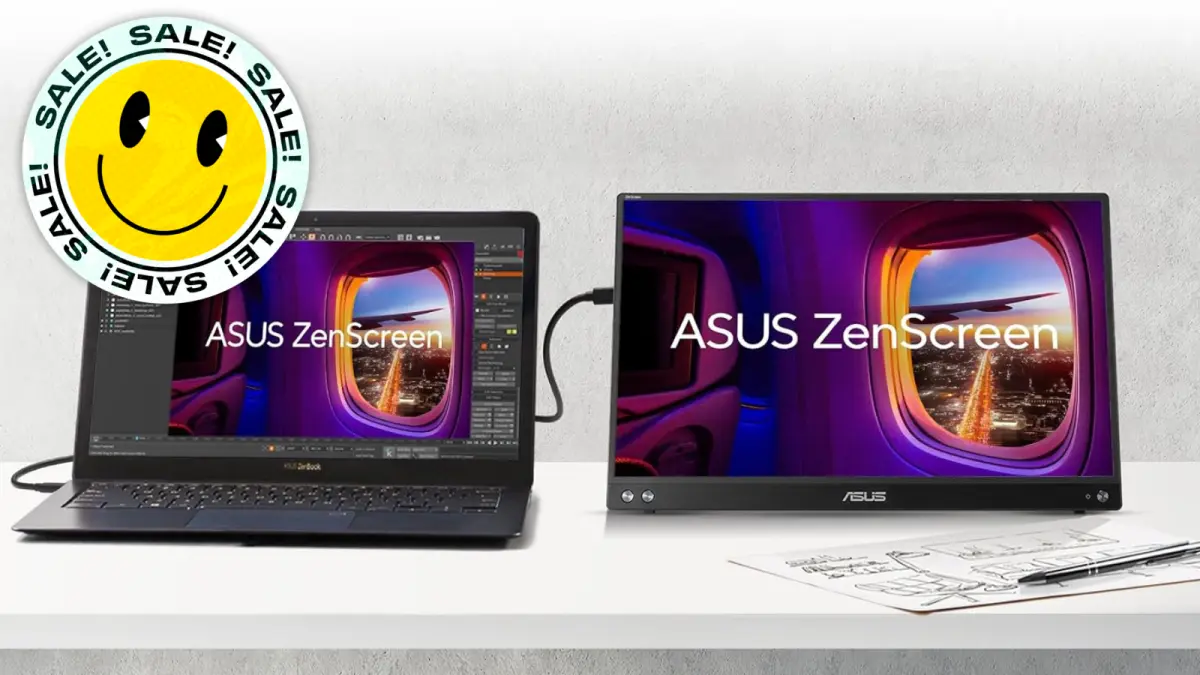
Save $54.60: As of Aug. 13, Amazon has the ASUS ZenScreen 15.6-inch portable monitor (MB16AHV) on sale for just $94.40. That's a 37% discount from its typical $149 price and the lowest cost ever recorded by price-tracking tools.
Remote work and hybrid schedules have made portable technology more essential than ever. For writers, programmers, financial analysts, and anyone who spends hours on a laptop, a single screen can feel incredibly limiting. That's where portable monitors come in, and the ASUS ZenScreen has become one of the most popular choices in this growing category. Now, with this significant price drop, even more users can justify adding one to their mobile setup.
Why the ASUS ZenScreen Stands Out
The ASUS ZenScreen series has been around for years, and each iteration gets more refined. The model on sale, the MB16AHV, is a 15.6-inch screen that easily slips into a backpack or messenger bag. It offers a 1920x1080 Full HD resolution, a common standard that ensures compatibility with most software and media. The display is rated for 250 nits of brightness, which is sufficient for indoor use and shaded outdoor environments.
One of the standout features is the way it connects. Unlike many older portable monitors that required both a video cable and a separate power adapter, the ZenScreen runs entirely through a single USB-C cable. This is possible because the monitor draws power directly from the connected laptop. For those using compatible laptops—including most recent MacBooks, Windows ultrabooks, and Chromebooks—this plug-and-play simplicity makes it feel like a natural extension of the computer. There are no confusing drivers to install on macOS or Windows 11, and it is also compatible with many Android phones that support DisplayPort Alternate Mode over USB-C.
Design and Portability
The ZenScreen is remarkably thin, measuring just 10.5mm at its thickest point. It has a slim bezel on three sides, giving it a modern look. The included smart cover not only protects the screen but also doubles as a kickstand, allowing users to prop the monitor up at a comfortable viewing angle. This is a significant improvement over earlier models that required a separate magnetic cover or an optional folding stand.
Weighing in at around 1.6 pounds, the MB16AHV is light enough to carry without adding noticeable bulk. It fits easily into a 15-inch laptop sleeve or the padded compartment of many backpacks. For extra protection, some users opt for a dedicated hard case or a neoprene sleeve, but the included cover is enough for daily commutes.
The Productivity Boost of Dual Screens
Having a second display while working on the go can dramatically improve workflow. Instead of constantly alt-tabbing between applications, you can place your research on one screen and your document on the other. For a writer, that means seeing interview notes, source material, or an assignment brief while typing in a word processor. For a financial planner, a spreadsheet can be stretched across both screens, revealing more columns and rows at once. Programmers can view code on one display and output or documentation on the other.
The benefits are not just about convenience. Studies have shown that using multiple monitors can increase productivity by as much as 42% in certain tasks, according to research from the University of Utah. While that study focused on traditional desktop setups, the same principles apply to portable monitors. Reducing the need to constantly switch windows saves time and reduces cognitive load, allowing for deeper focus.
The ZenScreen's USB-C connection also means there is no need to carry a power brick for the monitor. It uses a pass-through connection, so as long as your laptop has enough battery life, the monitor will stay powered. Some users have even connected the ZenScreen to a power bank via USB-C, although this requires a USB-C hub or a newer phone with DP Alt Mode support. For most people, the direct laptop connection is the primary and most reliable method.
Compatibility and Connection Options
While the MB16AHV is a USB-C monitor, it is important to note that not all USB-C ports support video output. Many standard USB-C ports on older laptops are for data and charging only. If you have a laptop with full-function USB-C, you are in luck. For those without, there are workarounds. The monitor can be connected using a USB-C to HDMI adapter or a USB-C to DisplayPort cable, but these require a separate power source. For most modern laptops, however, the single-cable connection works flawlessly.
The monitor also features a built-in kickstand on the back, which provides a stable base. It can be adjusted between a 15-degree and 60-degree tilt, so you can find the most comfortable viewing angle whether you are sitting at a coffee shop table or on a train tray. There are also mounting holes on the back, meaning you can attach it to a standard VESA mount or a desktop arm if you want to use it as a permanent second screen at home.
What Makes This Deal Special
As of this week, the ASUS ZenScreen MB16AHV is available at Amazon for $94.40. That is a 37% reduction from the list price of $149. According to price-tracking site camelcamelcamel, this is the lowest price ever offered on Amazon. This is not just a temporary sale; it represents a significant drop for a product that is usually considered a premium accessory.
To put this in perspective, most portable monitors with similar specifications sell for between $120 and $200. There are cheaper generic options, but they often lack the build quality, weight distribution, or reliability of a name-brand product like ASUS. The ZenScreen has a proven track record, and the MB16AHV is one of the most recent models in the lineup.
For years, the standard price of this monitor has hovered around $149. It has dipped to $130 on a few occasions, but only rarely. A drop to below $100 is a clear indicator that the seller wants to move inventory, likely due to newer models being released or seasonal promotions. For consumers, that means it's an excellent time to buy.
Potential Drawbacks to Consider
While the ZenScreen is a fantastic accessory, it's not without a few minor issues. The included USB-C cable is relatively short, so you will need to place your laptop close to the monitor. Some users have also reported that the monitor does not come with a dedicated charging adapter, meaning it relies entirely on the laptop's USB-C power delivery. If your laptop has a weak battery or a USB-C port that doesn't provide enough power, the monitor may not turn on. Most modern ultrabooks provide at least 15W of power, which is generally sufficient for this monitor.
Another consideration is that the monitor has a non-glare matte screen, which is great for use outdoors or in brightly lit rooms, but it does make colors look slightly less vibrant compared to glossy displays. If you do photo editing or color-sensitive work, this might not be the ideal primary monitor. However, for everyday productivity, documents, spreadsheets, and even video streaming, the quality is more than adequate.
How It Compares to Other ASUS ZenScreen Models
The ASUS ZenScreen lineup includes a variety of models, from 13-inch to 17-inch. The MB16AHV sits in the 15.6-inch category, which is the most popular size because it matches the dimensions of most laptop screens. The newer MB16ACV is very similar, but it adds a slightly brighter panel and a few extra features like even slimmer bezels. However, those newer models usually cost $50 to $80 more. The deal on the MB16AHV makes it an especially smart purchase for budget-conscious buyers.
There is also the high-end ZenScreen OLED, which offers outstanding contrast and rich colors, but it sells for over $300. For most professionals, the IPS panel in the MB16AHV provides the right balance of performance and affordability. The 1000:1 contrast ratio and 60Hz refresh rate are standard, and the panel covers 45% of the NTSC color gamut, which is typical for this price range.
Getting the Most Out of Your Portable Monitor
If you decide to take advantage of this deal, it is helpful to know how to best use a portable monitor with your existing devices. For Windows users, monitor settings can be adjusted in the display menu, allowing you to set the ZenScreen as an extended display or a mirrored screen. On macOS, the same options are available in System Settings under Displays. For gaming, the monitor supports a 60Hz refresh rate, so it is possible to use it as a secondary screen for console games handheld console like the Nintendo Switch.
The ZenScreen also works well as a presentation tool. You can carry it to a client meeting and share a presentation from your laptop while keeping your notes private on your primary screen. It is a versatile piece of kit that pays for itself in time saved and stress reduced.
To keep the monitor in good condition, always slide it into a protective sleeve or the included smart cover before placing it in a bag. The slim frame is sturdy but not indestructible, and the screen can crack if pressed against sharp objects. Regular cleaning with a microfiber cloth is also recommended. Avoid using alcohol-based cleaners on the display to prevent damage to the anti-glare coating.
Given its portability, low power requirement, and the fact that it can be used with nearly any laptop that has USB-C output, the ASUS ZenScreen MB16AHV is a remarkable value at $94.40. This is the lowest price we have seen, and if history is any guide, it may not stay at this level for long. When a deal this good appears on a top-rated accessory, it is worth grabbing before the stock runs out.
Having dual screens while working on the go really is a game-changer. And with this discount, it is more accessible than ever.
Source:Mashable News