

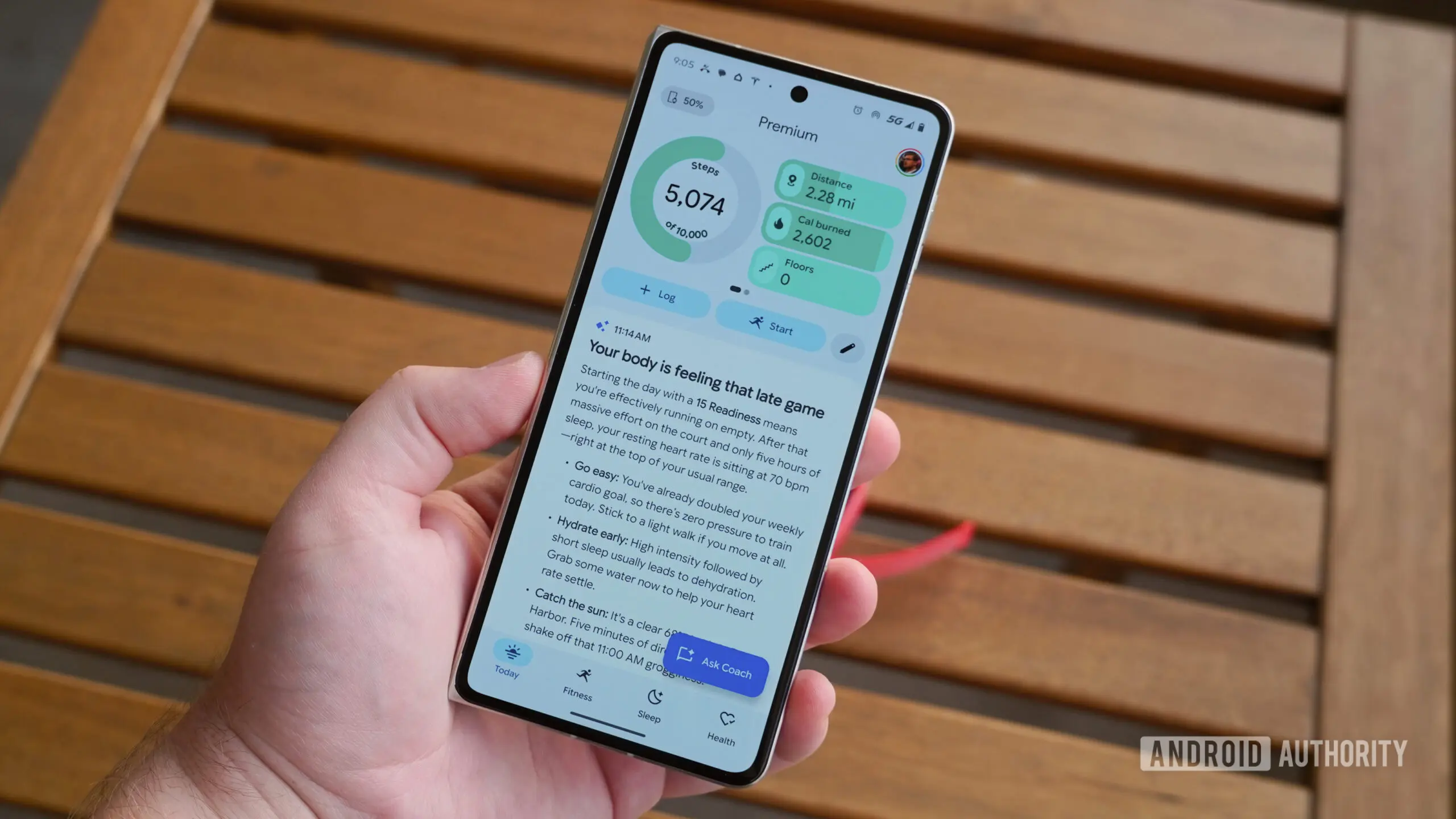
Google Health is rolling out a new update that gives users more control over the app's home screen experience. The latest version, 5.06, introduces an option called No Coach insights, which removes the AI-powered guidance from the Today tab. This change addresses a long-standing complaint from users who found the Health Coach recommendations intrusive or inaccurate.
What is Google Health Coach?
Google Health Coach is a generative AI assistant built into the Google Health app. Powered by Gemini, Google's large language model, the coach uses data stored in the user's health profile—such as activity logs, sleep patterns, weight measurements, and nutrition entries—to answer questions and offer personalized tips. The assistant is a central feature of the Google Health Premium subscription, which costs $9.99 per month or $99.99 per year.
When the feature launched, it was positioned as a way to make health data more actionable. Instead of simply displaying graphs and raw numbers, the app could interpret trends and offer suggestions like increasing water intake or adjusting sleep schedules. The coach was designed to provide what Google calls 'non-medical advice'—general wellness guidance rather than diagnostic or treatment recommendations.
The problem with AI insights
While the idea of an AI health coach is appealing, many early users found the execution frustrating. The Today tab, which serves as the app's main dashboard, often devoted a significant portion of screen space to long-form AI-generated insights. These blocks of text pushed user's actual health metrics further down the screen, making the app harder to navigate. For people who simply wanted to glance at their daily step count or heart rate, the AI commentary felt like clutter.
More importantly, the accuracy of the AI insights came under scrutiny. Some users reported that the coach occasionally produced recommendations that were generic or clinically questionable. For instance, it might interpret a single day of poor sleep as a chronic problem, or offer dietary suggestions that conflict with a user's specific medical conditions. Although Google clearly states the coach is not a medical device, users with chronic conditions found the unsolicited advice distracting at best and potentially harmful at worst.
One detailed user review noted that the coach's insights often repeated information already visible in the app's charts, adding no new value. The review highlighted a specific incident where the coach suggested the user eat more protein, despite the user's kidney condition that requires protein restriction. The reviewer concluded that the AI feature actually made the app worse, a sentiment echoed in many user forum threads.
The new toggle: How it works
The No Coach insights option is now available in Google Health version 5.06. According to Google's blog post about the update, the toggle removes Health Coach's verbose guidance and insights from the Today tab. Users who enable this option will no longer see long-form AI commentary on their home screen. Instead, the Today tab will focus on their core health metrics, activity rings, and any connected device data.
To turn off the insights, users need to follow a simple path:
- Tap their profile picture in the top right corner of the app.
- Select Google Health settings from the menu.
- Tap Coach.
- Choose No Coach insights.
Importantly, this toggle does not disable Health Coach entirely. Users who want to chat with the AI assistant can still access it through the dedicated Coach tab or by tapping the floating action button. The toggle only prevents the coach from inserting itself into the Today tab. This gives users the best of both worlds: they can use the AI when they need it, and avoid it when they don't.
Rollout details
Version 5.06 of Google Health is rolling out now to both Android and iOS devices. On Android, the update is being distributed through the Google Play Store. On iOS, it's available through the Apple App Store. As with most server-side feature rollouts, some users may see the toggle appear immediately after updating the app, while others might need to wait a few days for the feature to activate.
The update also includes several stability improvements and bug fixes, according to the release notes. Neither the company nor the app store listings mention any other new features beyond the AI toggle. However, the change signals that Google is paying attention to user feedback and is willing to scale back AI integration when it detracts from the core experience.
Broader context: AI in health apps
Google Health's decision to offer a toggle for AI insights reflects a broader trend in the tech industry. As generative AI becomes more common in consumer products, companies are learning that not every feature should be forced onto users. Health apps, in particular, must be cautious about how they present AI-generated advice. Data from wearable devices is deeply personal, and users may have different comfort levels with algorithmic interpretation of their health data.
Apple Health, Samsung Health, and Fitbit have also integrated AI features, but most have chosen to keep them separate from the main dashboard. Apple, for example, does not include a chatbot in its Health app; instead, it offers curated health trends and alerts. Samsung Health has experimented with AI-powered fitness coaching, but it requires the user to actively start a session. Google Health's approach—placing the AI coach front and center—was an outlier, and the company appears to be course-correcting.
The move also has privacy implications. Some users are concerned about their health data being used to train AI models. While Google has stated that Health Coach does not use user data for advertising purposes and that conversations are encrypted in transit, the presence of the AI on the Today tab made it harder to ignore. By allowing users to hide the coach, Google is giving them more control over how their data is displayed and used.
What this means for Health Coach's future
The introduction of the No Coach insights toggle does not signal the end of Health Coach. On the contrary, it may allow Google to iterate on the feature more freely. With the pressure to be always-on and always-present removed, the company can focus on improving the quality of the AI's responses. The toggle also creates a clear distinction between the passive insight feature and the active chat feature, which is how most users are likely to interact with the assistant.
Google has been steadily expanding the Health Coach's capabilities. Recent updates have added support for more health data sources, including continuous glucose monitors and blood pressure cuffs. The coach can now generate weekly summary reports and even suggest workout plans based on a user's performance trends. These features are available regardless of the Today tab setting, meaning users who opt out of insights still benefit from the coach's analytical abilities when they initiate a conversation.
For Google, this update is also a strategic move to increase adoption of Health Premium. Some users who were hesitant to subscribe because of the intrusive home screen experience may now be more inclined to try the premium tier. By giving potential subscribers an easy way to disable the AI, Google removes a significant barrier to entry.
How users are reacting
Early reactions from early access users have been largely positive. In community forums, users have praised Google for listening to feedback and acting quickly. The change is particularly welcome for people who have multiple devices synced to Google Health and rely on the Today tab for quick updates. Instead of scrolling past lengthy AI content, they can now see their latest steps, heart rate, and sleep data at a glance.
However, some users have expressed a desire for an even more granular control approach. They want the ability to choose which types of AI insights appear—for example, enabling sleep advice but disabling nutrition tips. Currently, the toggle is all-or-nothing: either all Coach insights are shown in the Today tab, or none are. Google has not announced whether it will introduce per-category controls in the future.
Another point of feedback is that the No Coach insights setting does not affect other AI-powered elements within the app, such as activity ring notifications or weekly summary push notifications. Some users have asked for a unified control panel for all AI features. It remains to be seen whether Google will address these requests in subsequent updates.
The update to version 5.06 is a small but meaningful step in the evolution of Google Health. As AI becomes increasingly embedded in everyday tools, the ability to customize the level of AI interaction will likely become a standard expectation. For now, users who want a cleaner, more traditional health tracking experience on the Today tab finally have the option to get it.
Source:Android Authority News