

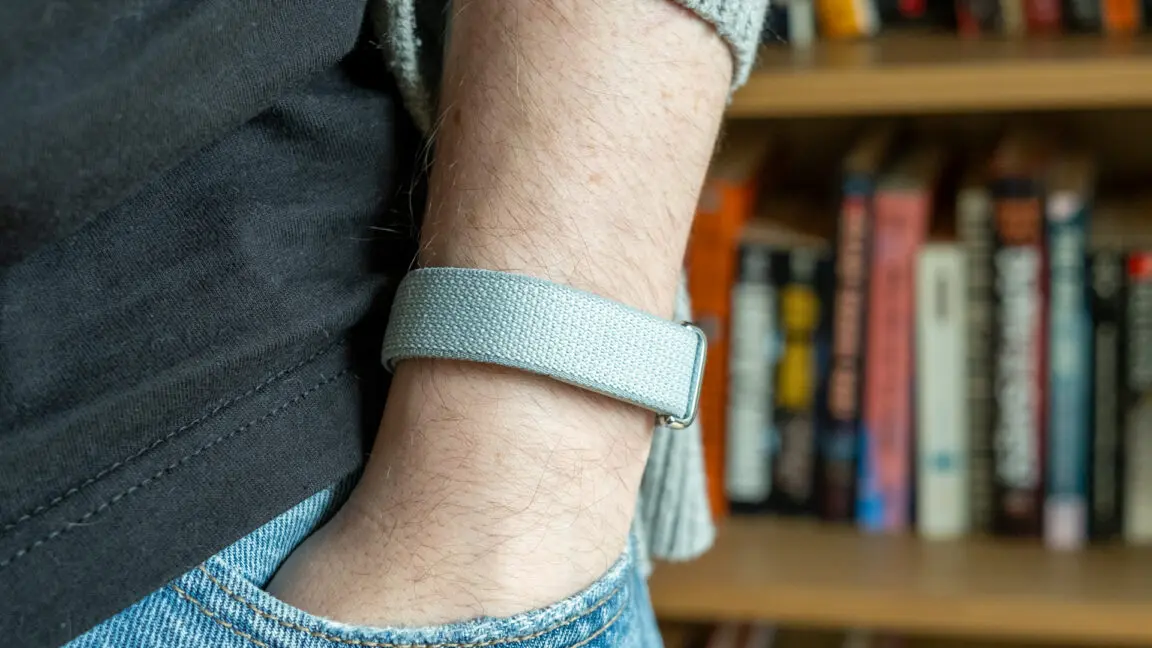
The Fitbit Air: A No-Frills Health Tracker
Smartwatches have become ubiquitous, offering everything from notifications to apps right on your wrist. But for those who simply want to monitor their health without digital distractions, the $100 Fitbit Air presents an intriguing alternative. This screenless puck of sensors strips away the complications of a full smartwatch, leaving behind a lightweight device that tracks your key biometrics. However, its simplicity comes with trade-offs, and the new AI-driven Health Coach feature can be more annoying than helpful.
The Fitbit Air has no display, no speaker, and only a single LED indicator for battery level. You interact with it by double-tapping to check battery status, and that is the extent of on-device controls. The vibration motor is reserved strictly for alarms—it cannot sync with phone notifications. This design philosophy makes the Air nearly forgettable on your wrist, which is ideal for continuous wear, especially during sleep. The lack of a screen also means you must rely on the Google Health app for all data visualization and analysis.
Design and Band Options
The Air itself is a small puck that snaps into a band. The stock Performance Band is made from a smooth polyester yarn with a Velcro closure and a metal loop. It is durable but absorbs moisture, making it less ideal for swimming or intense workouts. For those activities, Google offers the Active Band for $35, which is silicone and hides the puck more effectively. A more stylish Elevated Band is available for $50, made from a polyurethane material. The high cost of these bands—up to half the price of the tracker itself—is a significant drawback. Third-party options are currently scarce due to the unique mounting mechanism, but the simple snap-in design leaves hope for future accessories.
Tracking Capabilities and Accuracy
Despite its minimal exterior, the Fitbit Air houses a comprehensive suite of sensors: step counting, heart rate monitoring, blood oxygen (SpO2) tracking, and skin temperature sensing. It lacks an electrocardiogram (ECG) feature, which is a notable omission for those with heart health concerns. The device auto-detects workouts and logs them in the Google Health app. In testing, sleep tracking accurately matched perceived sleep and wake times, and the smart alarm function was effective. The readiness score—a metric combining recent activity, sleep, and recovery—proved to be a reliable indicator of how the reviewer felt each day. Data accuracy appears solid for a casual user, though long-time Fitbit enthusiasts may miss advanced metrics like blood pressure tracking or custom meal logging.
Battery Life and Charging
One of the standout features of the Fitbit Air is its battery life. It consistently lasts a full week on a single charge, even with continuous sensor monitoring and sleep tracking. The charging mechanism uses a proprietary magnetic cradle that attaches to the puck. Because there is no screen, the device sips power efficiently. This week-long endurance is a major advantage over many smartwatches that require daily charging.
The Google Health App and AI Coach
All data from the Fitbit Air flows into the new Google Health app, which replaces the old Fitbit app. The interface is clean and provides graphs, trends, and secondary metrics like sleep phases and readiness scores. However, the app is heavily integrated with Google’s Health Coach, an AI powered by Gemini that generates summaries and suggestions. Users who purchase the Air receive three months of Premium access, which enables the Coach by default. The Coach produces lengthy, often verbose explanations of your health data, filled with motivational language and sometimes inaccurate observations. In testing, it occasionally hallucinated workouts based on minor heart rate spikes or claimed data was missing when it was visible elsewhere.
While the Coach can be given custom instructions—such as adjusting for travel or personal circumstances—its value is questionable for most users. The insights often boil down to common sense advice like “make sure to rest after a big workout.” The AI’s constant presence and cringey praise can feel intrusive. Fortunately, you can disable the Health Coach in settings, but the option is buried. Without Premium, free users see a more concise, data-focused interface that many may prefer.
Performance and Use Cases
The Fitbit Air is best suited for individuals who want a simple, comfortable fitness tracker without the distractions of a smartwatch. It works seamlessly alongside a Pixel Watch if you own both, sharing data in the same app. For swimmers or serious athletes, the silicone Active Band is a better choice, though at an added cost. The device’s minimalism makes it easy to wear 24/7, and the week-long battery ensures you rarely need to think about charging. However, if you require real-time workout stats on your wrist, the lack of a display forces you to check the phone app constantly, which can be inconvenient during exercise.
Comparison to Alternatives
In the screenless tracker market, the Fitbit Air competes directly with the Whoop band, which requires a subscription starting at $30 per month (or $200 annually). At $100 with no mandatory subscription, the Air is far more affordable up front. The Whoop also focuses heavily on recovery and strain, and its data output is similarly app-dependent. Traditional fitness trackers like the Xiaomi Mi Band offer a screen for much less, but they lack the same sensor accuracy and ecosystem integration. The Air strikes a middle ground for those committed to Google’s health platform.
Long-Term Considerations for Fitbit Users
Google’s acquisition of Fitbit has brought significant changes. The transition to the Google Health app has removed some features that loyal users depended on, such as blood pressure monitoring (which relied on third-party apps) and custom meal creation. Basic layout customization is also missing, though Google has promised updates. For new users, these omissions are less noticeable, but the sense of feature regression may sour the experience for longtime Fitbit fans. The AI Coach appears to be a centerpiece of Google’s health strategy, but its current implementation adds more verbiage than value.
To banish the chatty Health Coach, users can navigate to their profile, then Your data > Feature Control > Google Health Coach, and disable it. However, the “Ask Coach” button remains, and tapping it will offer to reactivate the feature. This persistent nudging is reminiscent of other Google products where AI features are difficult to avoid.
The Fitbit Air itself is a worthy addition to the wearable space for those who prioritize comfort and simplicity. Its accurate sensors, long battery life, and lack of screen make it ideal for sleep tracking and all-day wear. The main downsides are the expensive bands and the sometimes intrusive AI coach. For $100, it offers a solid alternative to pricier smartwatches and subscription-based trackers, provided you are comfortable living without a screen and don’t mind the occasional digital cheerleading from an overly talkative AI.
Source:Ars Technica News