

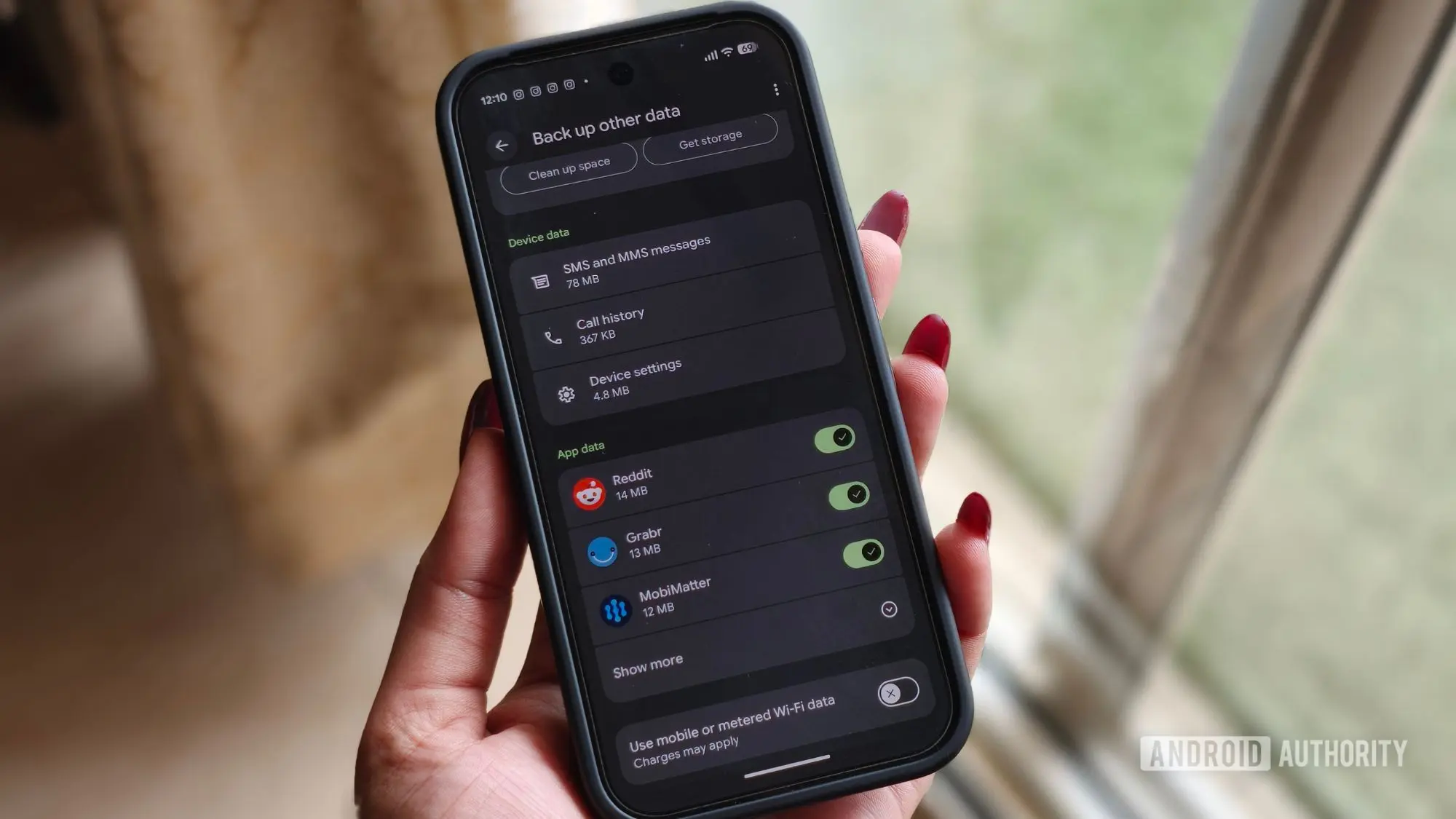
Google has announced a significant change to how Android backups consume Google Account storage. Starting now, all backup data—including text messages, call history, and device settings—will count toward the user's storage quota. Previously, only Google Photos uploads and multimedia messages (MMS) like photos and videos sent via SMS were charged against the free 15GB of storage that Google provides. This update aligns Android's backup behavior with that of many other cloud services, but the impact is expected to be minimal for most users.
What Exactly is Changing?
In the past, Android device backups were largely storage-neutral for most users. While app data, photos, and MMS were counted, the bulk of system-level information—such as SMS conversations, call logs, and various device settings—was stored without consuming any of the user's Google Account quota. This was a small but welcome perk for Android users, especially those who relied on Google's free tier. Now, as reported by 9to5Google, Google is rolling out a policy update that makes all Android backup data count toward your Google Account storage. This means that even the small configuration files and text-based data will now be part of the storage equation.
Google estimates that the average backup will grow by only about 40MB. To put this in perspective, a single high-resolution photo taken with a modern smartphone can easily be 5-10MB, so 40MB is roughly equivalent to four to eight photos. For users with ample storage—either through a paid Google One plan or those who haven't reached the 15GB limit—this change is unlikely to cause any issues. However, for those who are constantly juggling storage space, especially with free accounts, every megabyte counts.
Why the Change?
The shift in policy appears to be part of Google's ongoing effort to streamline its backup infrastructure and provide users with more granular control. In recent years, Google has been gradually moving toward a unified storage model across all its services. For example, Google Photos ended its free unlimited storage for high-quality photos in 2021, and now the company is applying similar logic to Android backups. By including all backup components in the storage quota, Google simplifies its accounting and encourages users to consider a paid Google One plan if they need more space.
But there is another side to this: user control. Until now, Android users had limited options to manage what got backed up. You could choose to back up or not, but the granularity was missing. With this update, Google is introducing new toggles that allow users to decide exactly which types of data to include. Specifically, you can now choose whether to back up SMS and MMS messages, call history, and device settings. This is a welcome addition for users who are privacy-conscious or simply want to save storage space by excluding data they consider unimportant.
How to Access the New Toggles
The new backup controls are rolling out gradually, and not all users may see them immediately. On Pixel devices, the path is: Settings app > Accounts and backup > Google Backup > Other device data. There, you should find three toggles: one for SMS and MMS, one for call history, and one for device settings. The company says the rollout has already begun, and existing Google Accounts will receive the updated storage policy over the coming months. This phased approach is typical for Google to ensure stability and to manage server loads.
For users on non-Pixel Android devices, the exact location of these settings may vary slightly depending on the OEM skin (like Samsung's One UI or Xiaomi's MIUI). However, the underlying Android backup API is the same, so the options should appear under similar Google Account backup menus. It's worth checking your device's backup settings in the coming weeks if you don't see them yet.
Historical Context and Comparison
Android's backup system has evolved significantly over the years. In the early days of Android, backup was virtually non-existent; users had to rely on third-party apps or manual data transfers. With Android 5.0 Lollipop, Google introduced automatic app data backups to Google Drive, but the implementation was inconsistent. Later, Android 9 Pie brought more comprehensive full-device backups, including call logs and SMS. However, those backups were not charged against storage, which was a luxury that many users took for granted.
Comparatively, Apple's iCloud backups have always counted toward the user's iCloud storage limit, which is only 5GB for free users. Android's free 15GB (shared across Gmail, Drive, and Photos) has been a more generous offering, but with this change, the playing field levels somewhat. However, Google's average 40MB increase is negligible compared to the typical 1-2GB iPhone backup, which can quickly fill a free iCloud account. Android users who rely on Google's free tier are unlikely to feel squeezed, unless they already have a large amount of data stored.
Potential Impact on Users
For the vast majority of Android users, this change will be barely noticeable. The extra 40MB is a drop in the bucket compared to the 15GB free allocation. However, there are edge cases. Users who have multiple Android devices backing up to the same Google account, or those who store many files in Google Drive and Gmail, might find themselves closer to the limit. Google One plans start at $1.99 per month for 100GB, which is a relatively affordable upgrade. The company is likely hoping that this policy shift will encourage more users to consider a paid plan to avoid storage management headaches.
Additionally, the new toggles offer a way to fine-tune storage usage. If you never restore call history or SMS messages when switching phones, you can simply disable those toggles and save a few megabytes. Over time, especially for power users who switch phones frequently, this could add up. The ability to exclude device settings can also help if you find that restoring old settings sometimes causes conflicts with new hardware.
Technical Details and User Experience
From a technical standpoint, the backup process remains the same. Android uses Google's backup service to periodically upload your device data to the cloud. The new policy simply changes how the storage usage is calculated. The backup data itself is encrypted and secure, and you retain full ownership of your information. The toggle controls are applied immediately; disabling a toggle will prevent future backups of that data type, but it does not delete any previously backed-up data unless you clear the backup entirely.
Users who are concerned about storage should monitor their Google Account storage dashboard. The change is being rolled out gradually, so you might not see the additional 40MB appear all at once. It may accrue over a few backup cycles. For those who are already near their storage limit, Google provides tools to manage and free up space, such as deleting old backups, clearing large files from Drive, or reducing the size of your Gmail inbox by deleting old emails with attachments.
Privacy Considerations
The new toggles also have privacy implications. Some users might not want their SMS and call history stored in the cloud for prolonged periods, even if encrypted. By offering the option to exclude this data, Google gives users more control over their digital footprint. This is especially relevant in regions with strict data protection laws, such as the European Union's GDPR. The ability to opt-out of backing up sensitive communications can help users comply with their own privacy standards.
It's worth noting that even if you disable backup for these categories, your data on the device itself remains unaffected. You can still view your call logs and text messages normally. The backup toggle only affects what gets uploaded to Google's servers. If you later decide to enable the toggle, a fresh backup will start including that data from that point onward—old data that was never backed up will not retroactively appear.
Rollout Timeline
Google has confirmed that the updated policy is rolling out now, and existing Google Accounts should receive it over the coming months. This means that if you don't see the new toggles today, you will likely see them in the next update to the Google Backup system. The company typically uses server-side changes for such updates, so no app update is required—just a refresh of the backup settings page. Pixel users may see the changes first, as Google often tests new features on its own devices before broad deployment.
For enterprise users or those with managed Google Workspace accounts, the same policy applies, but administrators may have additional controls through Google's Admin console. IT departments should be aware of this change when managing fleets of Android devices, especially if employees are using shared or corporate accounts with limited storage.
In summary, Google's latest Android backup change is a subtle but meaningful update. It adds a small amount of storage usage for most users but compensates with improved control over what gets backed up. The 40MB average increase is unlikely to cause problems, and the new toggles are a welcome feature for those who want to tailor their backup. As Android continues to evolve, such granularity helps users feel more in command of their data, aligning with broader industry trends toward transparency and user empowerment.
Source:Android Authority News